Stop relying on memory.
Clock in and out or add a shift manually. Keep hours and breaks together, so Friday doesn’t mean piecing together the rest of the week.
 Hours Tracker
Still adding up shifts from notes, messages, or memory? Track your work hours and breaks as you go. See your estimated pay and share a clear timesheet when the week is done.
For iPhone & iPad · Free with optional Pro purchases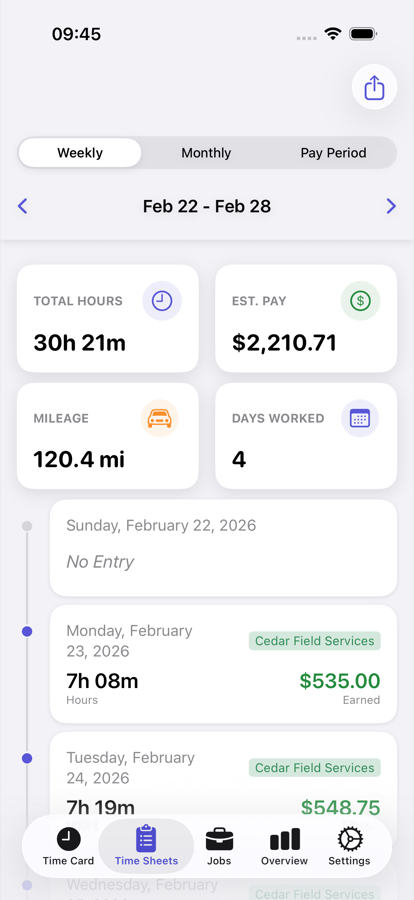
Clock in and out or add a shift manually. Keep hours and breaks together, so Friday doesn’t mean piecing together the rest of the week.
Review your hours and estimated pay before payday. Working more than one job? Pro keeps each job’s records separate with unlimited jobs.
Turn your logged work into a PDF timesheet to share. Need a spreadsheet? Pro adds Excel exports—without copying each shift into another sheet.
A free calculator solves a total once. Hours Tracker keeps your work logs together, so you can come back to your week instead of starting again.
Get Hours Tracker for iPhone & iPad ↗Clock in and out, record breaks, or add hours afterward.
See your recorded hours and estimated pay in your timesheet.
Export a PDF report, or an Excel spreadsheet with Pro.
Two free tools. No account needed.
The calculator is useful for a quick total, but its entries disappear when you reload or close the page. The app saves your work logs, so you can review your week and export a timesheet later.
Yes. Add a shift manually when the work is done. You can also clock in and out as you go and record breaks.
Yes. The free version supports one job. Pro adds unlimited jobs, so your records stay organized by job.
Hours Tracker is free to download, with optional Pro purchases. Pro adds features including unlimited jobs and Excel exports. Current options and prices are shown in the app before you buy.
No. It is an estimate based on your logged time and pay settings. Your payslip can differ because of taxes, deductions, and your employer’s rules.
Start with your next shift. Keep a record of your hours, review estimated pay, and send a timesheet when you need one.
Get Hours Tracker on the App Store ↗ Free to download. Optional Pro purchases in the app.